Sun May 10 2026
1. Introduction
2. Directory Structure
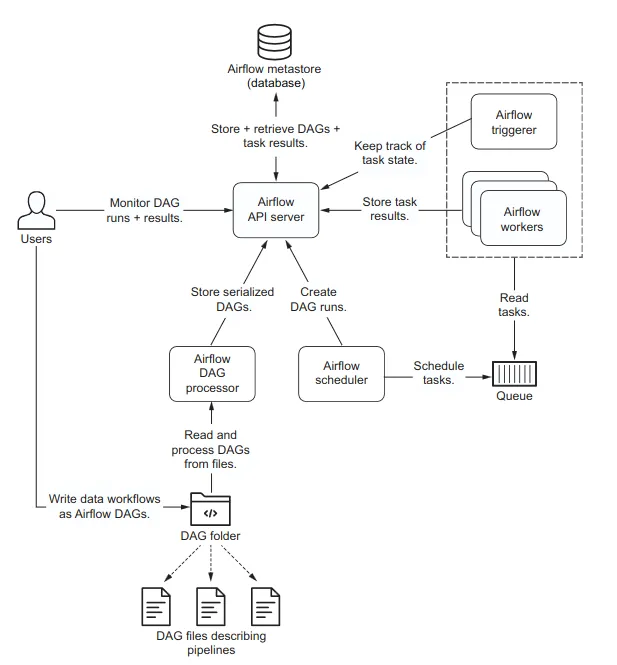
In this tutorial we build a pipeline orchestrated by airflow. The pipeline itself is within the airflow containers. Different airflow services, however, run in separate containers. The orchestrated pipeline consists of the following three components.
- Pipeline
- Aitrflow
- Docker
The Pipeline and Airflow components sit in their respective directories. The Docker components are in the project root as shown below.
project/
├── pipeline/
│   ├── config/
│   ├── data/
│   ├── src/
│   ├── tests/
│   ├── pyproject.toml
│   └── requirements.txt
├── airflow-components/
│   ├── config/
│   │   └── airflow.cfg
│   ├── dags/
│   │   ├── dag_1.py
│   │   └── dag_2.py
│   ├── logs/
│   ├── plugins/
│   └──airflow.env
├── Dockerfile
├── compose.yaml
├── .env
└── README.Docker.md
The primary airflow components are the dags, logs, plugins, and config. These components are what directly exposed to interact with the Airflow.
We mount these components in the container so that the container directly reads and write to these directories.
The pipeline is built in its separate directory as a python package. We install the pipeline as a python package in the Docker image.
The instructions to build the image and run the containers is laid out in the Dockerfile and compose.yaml files.
The env fies provide the configuration variables to be passed during image and container creation.
3. Creating Docker Image
3.1 Airflow Base Image
The Docker image is built using the Dockerfile. To build the Airflow image, we first create a Docker image for with bare minimum components. Once we have the base image, we can add further layers depneding on the requirements. This allows us to use the same airflow base image for different projects.
# syntax=docker/dockerfile:1
ARG PYTHON_BASE
FROM python:${PYTHON_BASE}-slim AS airflow-base

ARG PYTHON_BASE
ARG AIRFLOW_VERSION

ENV PYTHON_BASE=${PYTHON_BASE}
ENV AIRFLOW_VERSION=${AIRFLOW_VERSION}
ENV AIRFLOW_HOME=/opt/airflow
WORKDIR ${AIRFLOW_HOME}

ARG CONSTRAINT_URL="https://raw.githubusercontent.com/apache/airflow/constraints-${AIRFLOW_VERSION}/constraints-${PYTHON_BASE}.txt"

RUN python -m pip install "apache-airflow==${AIRFLOW_VERSION}" --constraint "${CONSTRAINT_URL}"

ENV AIRFLOW_CONSTRAINT_URL=${CONSTRAINT_URL}

ENTRYPOINT ["airflow"]
CMD ["--help"]
We start by pulling a slim version of python image that contains the necessary components to run a python program.
To build the airflow image, we need the python and airflow versions we are using. We do so by defining these two as environment variables that must be passed to Docker during image build.
Before fetching the airflow package, it requires setting the airflow home directory. The standard choice is to se it to /opt/airflow.
By default the directory where the packages would be installed is root. We can change the directory using WORKDIR.
This sets the directory where all the following commands would run. Here, we set it to AIRFLOW_HOME.
Having set up the installation requirements, we can now proceed to install the airflow package.
To install the package, one rwquires to specify the constraint file URL for the given airflow and python version.
We set this constarint URL as environment variable as the same URL is required when installing the airflow providers to install compatible versions.
The RUN command executes the installation command.
After setting up the installation we add the commands to execute when the container is launched.
The airflow base image provides the base layer to build further application and not supposed to be used as a standalone app.
So, we don’t need to specify any command. However, for the sake of brevity, we include the airflow --help.
The ENTRYPOINT defines the command to be executed when the container starts. CMD specifies the default arguments to be passed to the command defined by ENTRYPOINT.
The ENTRYPOINT has two forms: list form and string form. When the command is specifed as a string, Docker prefixes the command with /bin/sh -c to execute the command inside the shell.
However, when specifed as a list, the command is executed in exec form meaning the command is executed as a primary node instead of as a child node inside shell.
This creates the difference when the Docker daemon needs to communicate the service to shutdown.
When the command is specified in exec form, the daemon is able to interact directly with the service and instruct SIGTERM when the container needs to be shut down.
3.2 Pipeline Image
For our purpose in this tutorial we simply include this base image Dockerfile into the project’s Dockerfile.
This leads us to a multi-stage image build. The instructios upto the second FROM statement in the below Dockerfile build the base airflow image.
The second block uses the built image as its base and adds further layers on top of it.
# syntax=docker/dockerfile:1

ARG PYTHON_BASE
FROM python:${PYTHON_BASE}-slim AS airflow-base

ARG PYTHON_BASE
ARG AIRFLOW_VERSION

ENV PYTHON_BASE=${PYTHON_BASE}
ENV AIRFLOW_VERSION=${AIRFLOW_VERSION}
ENV AIRFLOW_HOME=/opt/airflow
WORKDIR ${AIRFLOW_HOME}

ARG CONSTRAINT_URL="https://raw.githubusercontent.com/apache/airflow/constraints-${AIRFLOW_VERSION}/constraints-${PYTHON_BASE}.txt"

RUN python -m pip install "apache-airflow==${AIRFLOW_VERSION}" --constraint "${CONSTRAINT_URL}"

ENV AIRFLOW_CONSTRAINT_URL=${CONSTRAINT_URL}

FROM airflow-base

ARG AIRFLOW_VERSION=${AIRFLOW_VERSION}
ARG CONSTRAINT_URL=${AIRFLOW_CONSTRAINT_URL}

RUN python -m pip install "apache-airflow-providers-fab" --constraint "${CONSTRAINT_URL}"
RUN python -m pip install "apache-airflow-providers-postgres" --constraint "${CONSTRAINT_URL}"
RUN python -m pip install psycopg2-binary

WORKDIR /app

COPY requirements.txt ./
RUN pip install -r requirements.txt

COPY . .

RUN pip install --no-deps -e ./pipeline

ENTRYPOINT ["/bin/bash", "-c"]

CMD []
In the second block, we install the two service providers: fab for authentication and postgres for metadata storage.
To work with the postgres database, one needs a python client library psycopg2, which we install as a binary.
While adding the project’s codebase in the image, we can employ the Docker’s cache validation into good use and separate the project’s dependency requirements from the project’s codebase. This speeds up the development and maintainence phases. If we modify the codebase, the requirements would not be installed from scratch.
We store the project’s codebase inside the /app directory and set the WORKDIR to /app.
4. Creating Docker Container
x-airflow-common:
  &airflow-common
  image: flight-etl
  build: .
  env_file:
    - airflow.env
    - .env
  environment:
    &airflow-common-env
    AIRFLOW__CORE__EXECUTOR: LocalExecutor
    AIRFLOW__CORE__AUTH_MANAGER: airflow.providers.fab.auth_manager.fab_auth_manager.FabAuthManager
    AIRFLOW__DATABASE__SQL_ALCHEMY_CONN: postgresql+psycopg2://${POSTGRES_USER}:${POSTGRES_PASSWORD}@postgres:5432/${POSTGRES_DB}
    AIRFLOW__CORE__FERNET_KEY: ${AIRFLOW__CORE__FERNET_KEY}
    AIRFLOW__CORE__DAGS_ARE_PAUSED_AT_CREATION: 'false'
    AIRFLOW__CORE__LOAD_EXAMPLES: ${AIRFLOW__CORE__LOAD_EXAMPLES:-'true'}
    AIRFLOW__CORE__EXECUTION_API_SERVER_URL: 'http://airflow-api-server:8080/execution/'
    AIRFLOW__API_AUTH__JWT_SECRET: ${AIRFLOW__API_AUTH__JWT_SECRET:-airflow_jwt_secret}
    #AIRFLOW__API_AUTH__JWT_ISSUER: ${AIRFLOW__API_AUTH__JWT_ISSUER:-airflow}
    AIRFLOW__SCHEDULER__ENABLE_HEALTH_CHECK: 'true'
    # AIRFLOW__SCHEDULER__HEALTH_CHECK_SERVER_PORT: 8974
    AIRFLOW_CONFIG: '/opt/airflow/config/airflow.cfg'
  volumes:
    - ${AIRFLOW_PROJ_DIR:-.}/dags:/opt/airflow/dags
    - ${AIRFLOW_PROJ_DIR:-.}/logs:/opt/airflow/logs
    - ${AIRFLOW_PROJ_DIR:-.}/config:/opt/airflow/config
    - ${AIRFLOW_PROJ_DIR:-.}/plugins:/opt/airflow/plugins
    - type: bind
      source: ./flight-etl/data
      target: /app/data
    - type: bind
      read_only: true
      source: ./flight-etl/config
      target: /etc/etl/config
    # - type: bind
    #   read_only: true
    #   source: ./flight-etl/src/etl
    #   target: /app/etl
  depends_on:
    &airflow-common-depends-on
    postgres:
      condition: service_healthy

services:
  postgres:
    image: postgres:16
    env_file:
      - airflow.env
    environment:
      POSTGRES_USER: ${POSTGRES_USER}
      POSTGRES_PASSWORD: ${POSTGRES_PASSWORD}
      POSTGRES_DB: ${POSTGRES_DB}
    volumes:
      - postgres-db-volume:/var/lib/postgresql/data
    healthcheck:
      test: ["CMD", "pg_isready", "-U", "${POSTGRES_USER}", "-d", "${POSTGRES_DB}"]
      interval: 5s
      retries: 1
      start_period: 10s
    restart: always

  airflow-api-server:
    <<: *airflow-common
    entrypoint: ["airflow"]
    command:  [api-server , --port, "${AIRFLOW_API_SERVER_PORT}"]
    environment:
      <<: *airflow-common-env
    ports:
      - "${AIRFLOW_API_SERVER_PORT}:${AIRFLOW_API_SERVER_PORT}"
      - "8974:8974"
    healthcheck:
      test: ["CMD", "curl", "--fail", "http://localhost:8974/api/v2/monitor/health"]
      interval: 10s
      timeout: 10s
      retries: 1
      start_period: 10s
    restart: always
    depends_on:
      <<: *airflow-common-depends-on
      airflow-init:
        condition: service_completed_successfully

  airflow-scheduler:
    <<: *airflow-common
    entrypoint: [airflow]
    command: [scheduler]
    environment:
      <<: *airflow-common-env
    healthcheck:
      test: ["CMD", "curl", "--fail", "http://localhost:8974/api/v2/monitor/health"]
      interval: 10s
      timeout: 10s
      retries: 1
      start_period: 10s
    restart: always
    depends_on:
      <<: *airflow-common-depends-on
      airflow-init:
        condition: service_completed_successfully

  airflow-dag-processor:
    <<: *airflow-common
    entrypoint: [airflow]
    command: [dag-processor]
    environment:
      <<: *airflow-common-env
    healthcheck:
      test: ["CMD-SHELL", 'airflow jobs check --job-type DagProcessorJob --hostname "$${HOSTNAME}"']
      interval: 10s
      timeout: 10s
      retries: 1
      start_period: 10s
    restart: always
    depends_on:
      <<: *airflow-common-depends-on
      airflow-init:
        condition: service_completed_successfully

  airflow-triggerer:
    <<: *airflow-common
    entrypoint: [airflow]
    command: [triggerer]
    environment:
      <<: *airflow-common-env
    healthcheck:
      test: ["CMD-SHELL", 'airflow jobs check --job-type TriggererJob --hostname "$${HOSTNAME}"']
      interval: 10s
      timeout: 10s
      retries: 1
      start_period: 10s
    restart: always
    depends_on:
      <<: *airflow-common-depends-on
      airflow-init:
        condition: service_completed_successfully

  airflow-init:
    <<: *airflow-common
    entrypoint: ["/bin/bash", "-c"]
    command:
      - |
        airflow db migrate && \
        airflow users create \
          --username ${AIRFLOW_USERNAME} \
          --firstname ${AIRFLOW_FIRSTNAME:-Admin} \
          --lastname ${AIRFLOW_LASTNAME:-user} \
          --role Admin \
          --email ${AIRFLOW_EMAIL} \
          --password ${AIRFLOW_PASSWORD}||true
    environment:
      <<: *airflow-common-env
    depends_on:
      <<: *airflow-common-depends-on

volumes:
  postgres-db-volume: